

This tutorial explains how to deposit PHTAYA safely and correctly. It focuses only on the funding process, with available methods, clear steps, important reminders, and common issues—so you can add funds without confusion. No platform review, no promotions, just practical instructions.
What to Know Before You Deposit
Before making your first deposit, it helps to prepare a few basics to avoid delays:
- Active PHTAYA account with successful login
- Payment method ready (bank transfer, e-wallet, or cryptocurrency)
- Stable internet connection during the transaction
- Awareness that limits and processing times may vary by method and verification
You don’t need to deposit immediately after registration. Funding is optional and can be done whenever you’re ready.
Available Deposit Methods at PHTAYA
PHTAYA supports several common funding options. Choose the method that best matches your preference and availability:
- Bank Transfer – Direct transfer through supported banking channels
- E-Wallet – Funding via compatible digital wallets
- Cryptocurrency – Funding using supported crypto networks
Each method follows a similar flow inside the cashier, with small differences in confirmation steps.
Step-by-Step Guide to Deposit PHTAYA
Follow the steps below for a smooth deposit experience.
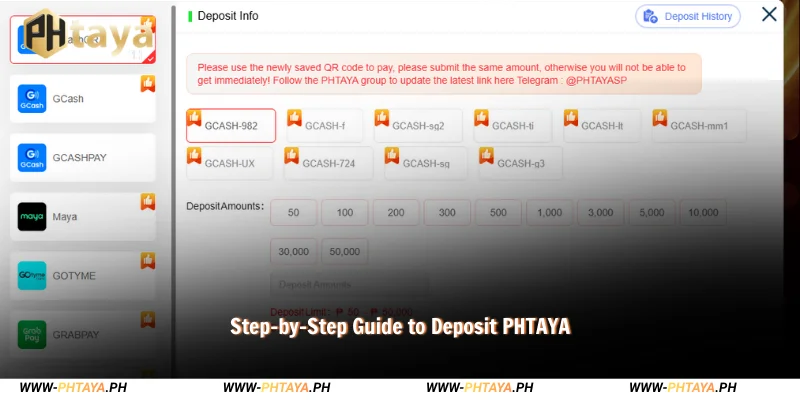
Deposit via Bank Transfer
This is a commonly used option for many players.
- Log in to your PHTAYA account.
- Navigate to Deposit from the account menu.
- Select Bank Transfer as your payment method.
- Enter the deposit amount and review the bank details shown on screen.
- Confirm the transaction after checking all information carefully.
After confirmation, processing time may vary depending on the bank and verification status. Keep the transaction reference until the balance updates.
Deposit via E-Wallet
E-wallet deposits follow a similar process with faster authorization in many cases.
- Log in and go to Deposit.
- Choose E-Wallet and select your preferred wallet.
- Enter the amount you wish to deposit.
- Review the details and confirm the payment.
You may be redirected to your wallet app or authorization screen to complete the transaction. Return to PHTAYA to check the updated balance.
Deposit via Cryptocurrency
Cryptocurrency deposits require extra attention to network compatibility.
- Log in and select Deposit.
- Choose Cryptocurrency as the method.
- Select the network displayed on the screen.
- Copy the provided wallet address and enter the amount.
- Send the funds from your crypto wallet and confirm.
Always double-check the address and network before sending. Processing time depends on network conditions and confirmations.
See more: Register PHTAYA – Step-by-Step Account Registration Guide
Important Notes Before Depositing
Keep these reminders in mind to reduce the chance of errors:
- Verify all details before confirming a transaction.
- Deposit limits may apply depending on the payment method and account status.
- Processing times may vary and are not guaranteed.
- Save or screenshot transaction references until your balance updates.
Following these steps helps ensure your funds are credited correctly.
Common Deposit Issues & How to Fix Them
If you encounter a problem while you deposit PHTAYA, these quick checks often help:

- Deposit pending: Wait a few minutes and refresh your balance. Processing can vary by method.
- Incorrect amount entered: Check the transaction details and compare them with your payment confirmation.
- Balance not updated: Ensure the transaction was completed successfully on the payment provider’s side, then contact support with your reference if needed.
Using official support channels is the best way to resolve unresolved issues.
What to Do After Depositing
Once your deposit is successful, take a moment to:
- Confirm your balance reflects the added funds.
- Keep transaction records for future reference.
- Proceed to use platform features at your own pace.
There’s no requirement to use funds immediately after they appear in your account.
Frequently Asked Questions About Deposit PHTAYA
Even after following the steps above, some users may still have quick questions about payment methods, processing time, or common deposit issues. The FAQs below cover the most common concerns when you deposit PHTAYA, so you can fund your account with more confidence.
Is a deposit required to register?
No, you can create an account without making a deposit.
How long does a deposit usually take?
Timing depends on the payment method and verification status.
Can I cancel a deposit request?
Once a payment is confirmed, cancellation may not be possible. Check details before confirming.
Are all deposit methods available at all times?
Availability can vary due to maintenance or provider conditions.
Conclusion
Depositing funds is a straightforward process when you follow the correct steps. This guide shows you how to deposit PHTAYA using supported methods, what to check before confirming, and how to handle common issues. Review your details carefully, keep transaction records, and proceed when you’re ready.
