

This guide explains how to withdraw PHTAYA funds safely and correctly. It focuses only on the withdrawal process, and what to prepare, clear steps to follow, how to track your request, and how to resolve common issues, so you can cash out with confidence. No promotions, no guarantees, just practical instructions.
What to Know Before Withdrawing from PHTAYA
Before submitting a withdrawal request, make sure the following basics are in place to avoid delays:
- Active account access: You must be able to log in successfully.
- Verified details: Identity or account verification may be required before withdrawals are approved.
- Matching bank information: Withdrawal details should match the information registered on your account.
- Bonus conditions: If you used bonuses, wagering requirements may apply before a withdrawal can be processed.
- Variable limits: Withdrawal limits and processing times may vary by method and account status.
Preparing these items in advance helps keep the cash-out process smooth.
Step-by-Step Guide to Withdraw PHTAYA
Follow the steps below in order to submit a withdrawal request correctly.
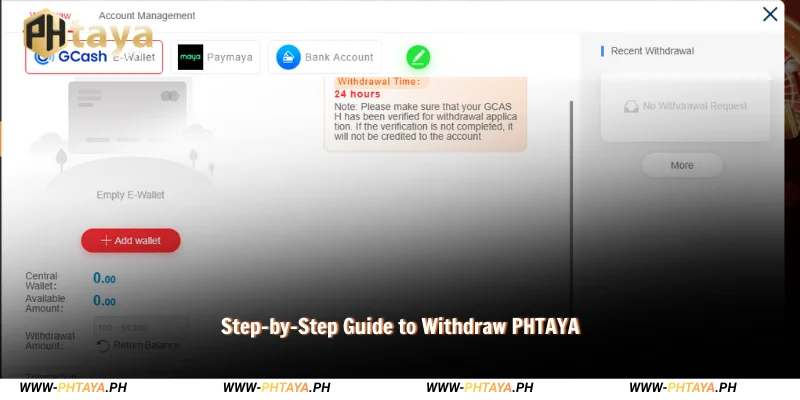
Step 1 – Log In to Your Account
Visit the official website and log in using your username and password. If prompted, complete any pending profile or security checks to ensure your account is ready for withdrawal.
Step 2 – Access the Withdrawal Section
Once logged in, open your account menu and select Withdraw. This will take you to the withdrawal interface, where available methods are displayed.
Step 3 – Enter Withdrawal Details
Carefully complete the withdrawal form:
- Choose a withdrawal method (such as bank transfer).
- Enter the withdrawal amount you wish to cash out.
- Confirm bank or payment details to ensure they are accurate and up to date.
Double-check all information before proceeding. Incorrect details are a common cause of delays.
Step 4 – Confirm & Submit the Request
After reviewing your entries, submit the withdrawal request. A confirmation message or status update should appear once the request is received. Processing time may vary depending on verification status, payment method, and internal checks. Keep a record of the request for reference.
Processing Time & Withdrawal Status
After submitting your request, you can monitor progress through the transaction history or withdrawal status section in your account.
A withdrawal may show as “pending” for several reasons, including:
- Ongoing verification checks
- Review of account activity
- Payment provider processing times
Pending status does not necessarily indicate a problem. Allow a reasonable time for the request to be processed.
Common Withdrawal Issues & How to Fix Them
If you encounter difficulties when you withdraw PHTAYA, these tips may help:

- Withdrawal pending: Check your status page and ensure all verification steps are completed.
- Incorrect bank details: Review your registered information and update it if necessary before submitting a new request.
- Verification required: Provide requested documents promptly to avoid extended review times.
If the issue remains unresolved, contacting customer support through official channels is the best next step.
What to Do After a Successful Withdrawal
Once your withdrawal is completed:
- Check your bank balance to confirm receipt.
- Save transaction records for future reference.
- Review account status to ensure no further actions are required.
Keeping records can be helpful if you need assistance later.
Frequently Asked Questions About Withdrawal PHTAYA
Even after completing the steps above, you may still have quick questions about withdrawal requirements, status updates, or why a request can remain pending. The FAQs below cover the most common concerns when you withdraw PHTAYA, helping you track your cashout and avoid avoidable delays.
Is withdrawal available at any time?
Availability can vary depending on system status and payment methods.
Can I cancel a withdrawal request?
Once submitted, cancellation may not be possible. Review details carefully before confirming.
Why is my withdrawal under review?
Reviews may occur due to verification checks, bonus conditions, or account security procedures.
Do withdrawal limits apply?
Yes, limits may vary by account level and payment method.
Conclusion
Withdrawing funds is straightforward when you follow the correct steps and prepare in advance. This guide shows you how to withdraw PHTAYA safely, what to check before requesting, how to submit a withdrawal, and how to handle common issues. Review your details carefully, track your request through the account dashboard, and contact support if you need further assistance.
